Sales
How to build a prospect list in RegieGO: 5 steps, starting with a chat
The Regie Team
|
Nov 18, 2026

Someone asks who you sell to, and you can explain it easily. Heads of Sales at software companies, mostly in the US, usually with 50 to 200 employees.
Then you sit down to build the list, and that simple description turns into filters, searches, company websites, and a spreadsheet full of half-finished rows. You know who you’re looking for. Getting them into a list you can use is the time-consuming part.
Here’s how to build a prospect list in RegieGO: start with the description itself. Tell the chat who you want to reach, review the matches, and save the prospects you want to work. From there, you can find contact details, research the accounts, and prepare outreach in the same platform.
A prospect list, also called a prospecting list, is the set of people you plan to contact, chosen by role, company and fit. It’s only useful once you can explain why each person is on it and how you’ll reach them.
We’ll use one audience throughout. You can copy the prompts and change them to fit your business.
1. Describe the buyers you want to find
Let’s say you sell software that helps sales teams onboard new reps. Your starting audience is sales leaders at US software companies with 50 to 200 employees.
Open a chat and explain that:
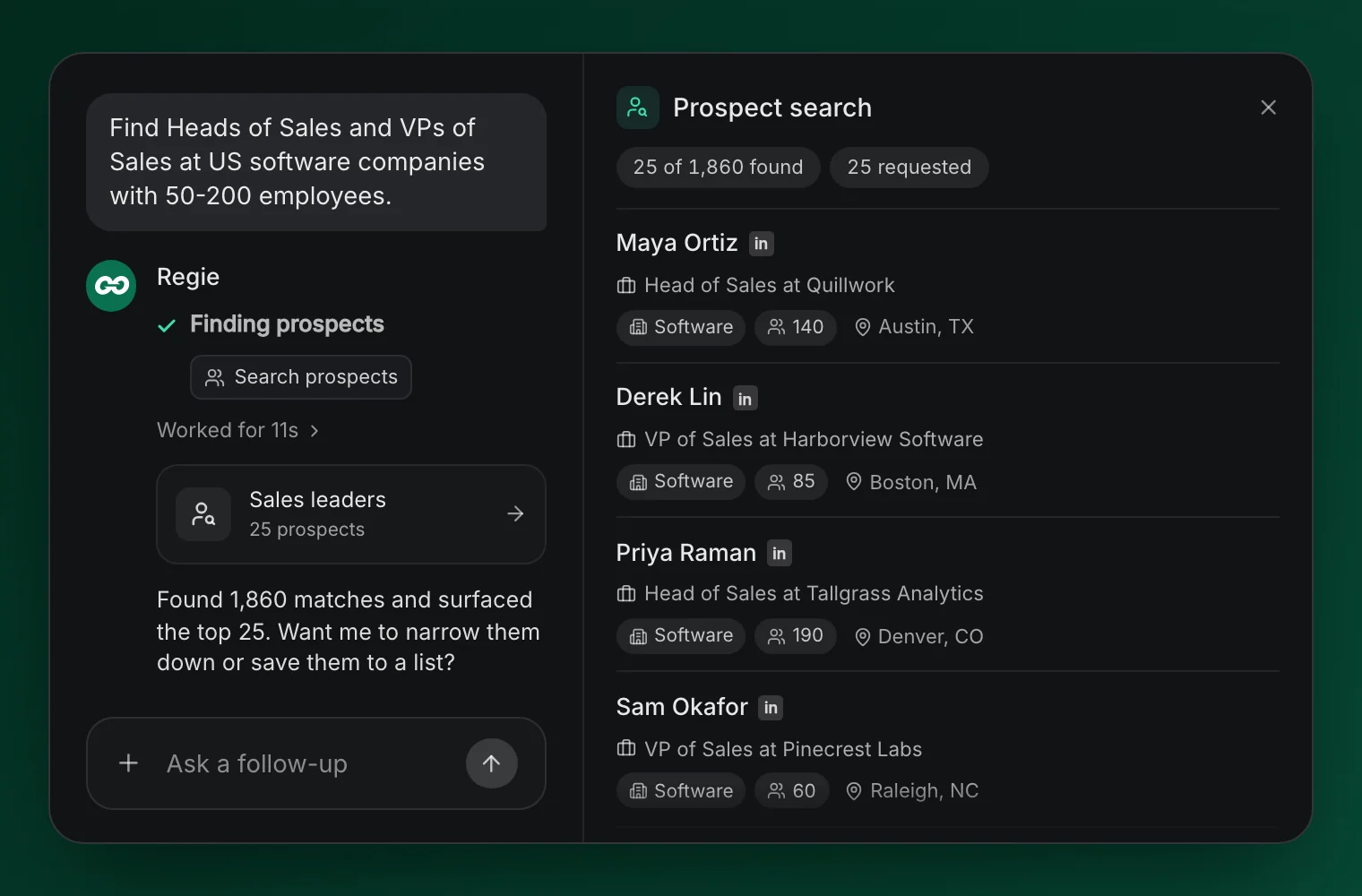
Find Heads of Sales and VPs of Sales at US software companies with 50-200 employees.
RegieGO searches a licensed B2B people and company database for matches. You’re giving it a search brief that it can act on, with real records to review.
The useful details are the same ones you’d give a teammate: company type, location, size, and the roles you need. If you’re unsure about the audience, pick one reasonable segment to start with. You can change it once you see the results.
Already have a target-account list? You can bring a CSV or use connected HubSpot or Salesforce data instead of starting from scratch. Ask for the relevant people at those companies, then follow the same steps below.
2. Refine the matches before making the list bigger
Look at a few results and ask yourself whether these are people you’d be happy to contact. If something feels off, explain what you want to change.
For example:
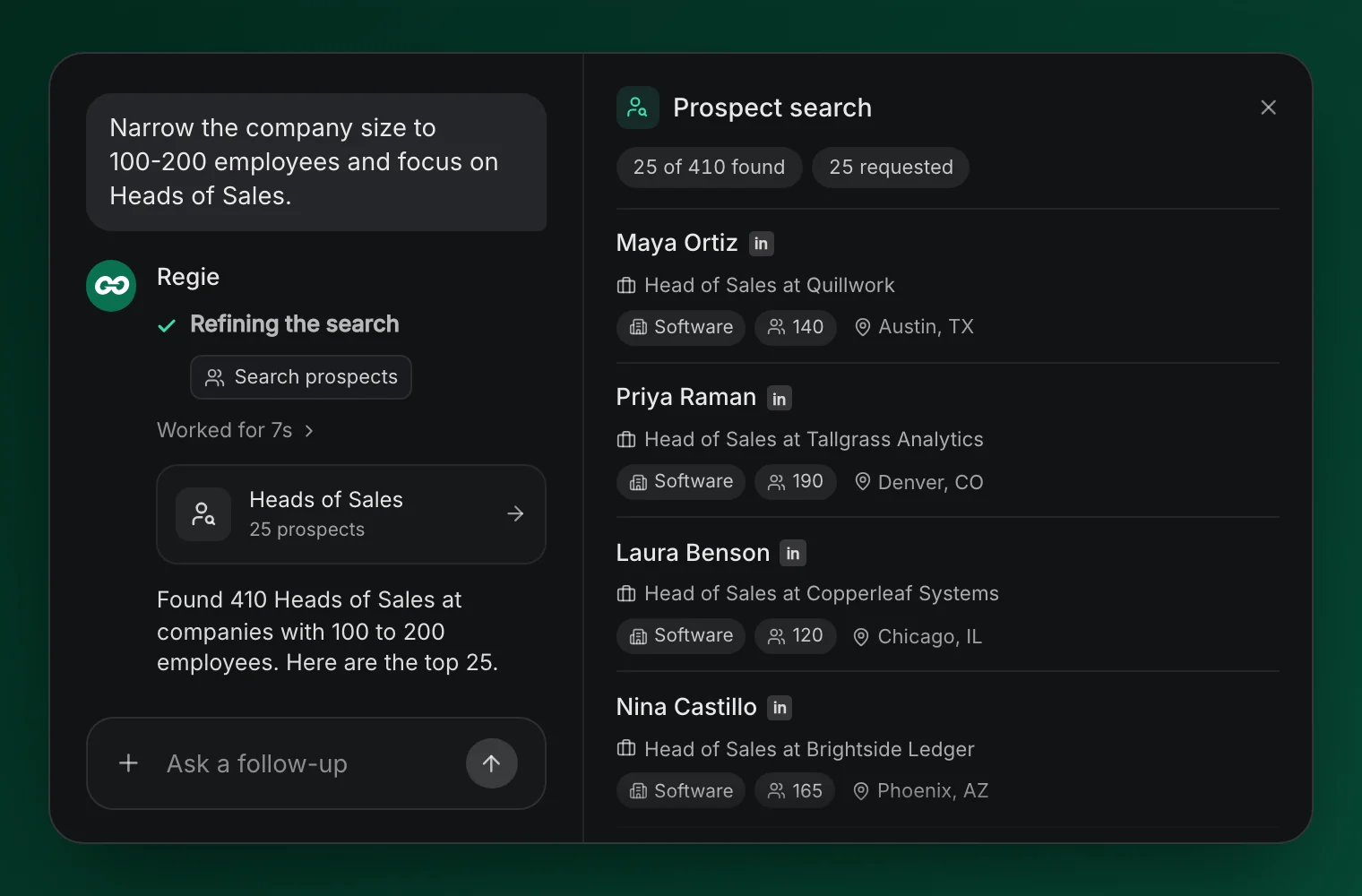
Narrow the company size to 100-200 employees and focus on Heads of Sales.
You might realize that smaller teams rarely need your product, or that a different role usually owns the buying decision. This is the point to adjust the search, before you spend time and credits preparing outreach for the wrong audience.
There’s no prize for making the largest possible list. A smaller group you understand gives you a better starting point for a conversation and clearer feedback when people reply.
Keep reviewing until you can explain why the companies and people belong on your list.
3. Save a list you can find and use again
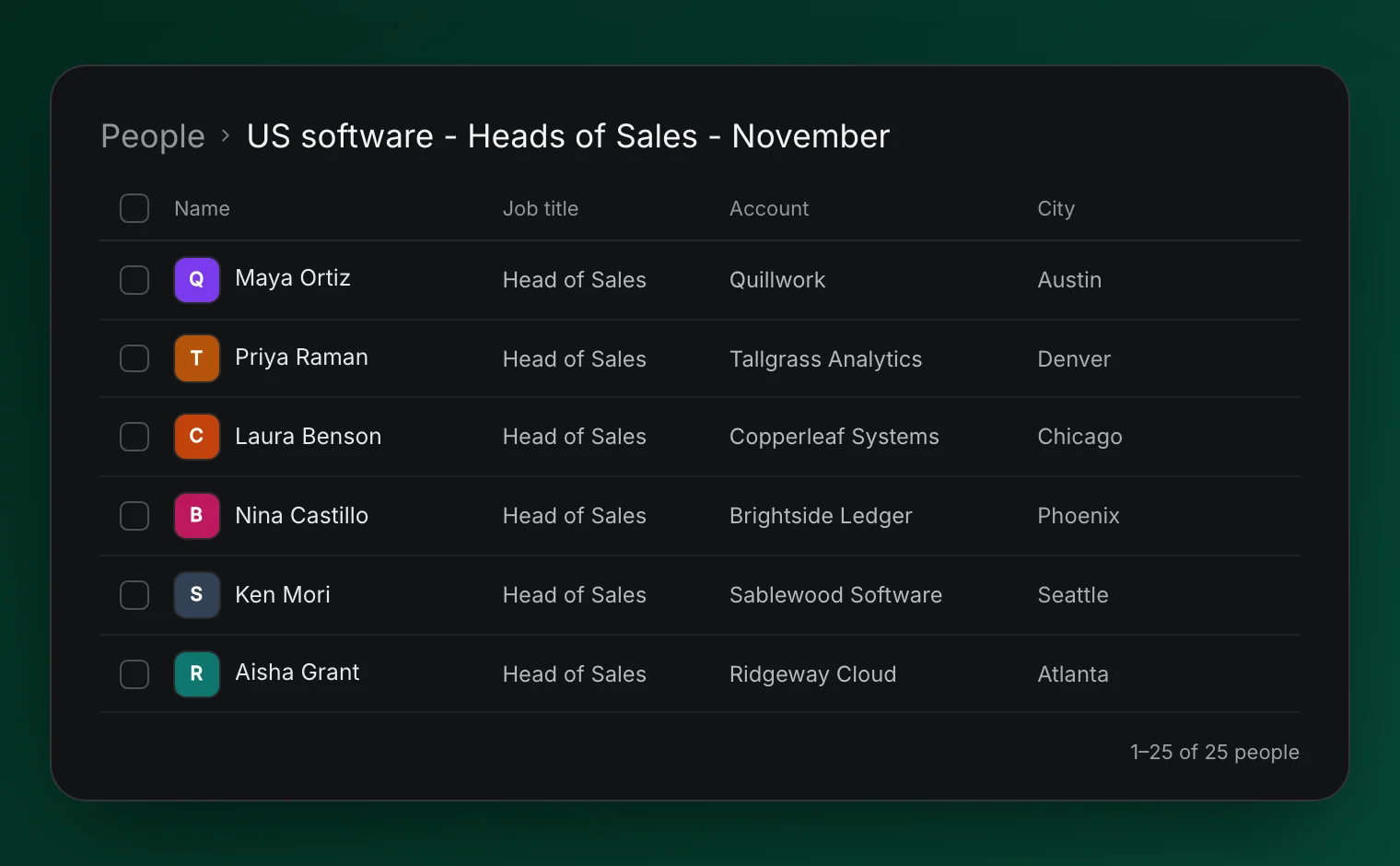
Once you’re happy with the matches, save the selected people to a named list. Use a name that makes sense when you come back next week, such as “US software - Heads of Sales - November.”
You can ask:
Save these selected contacts to a static list called “US software - Heads of Sales - November.”
A static list keeps the people you selected and changes when you edit it. It works well for a specific outreach campaign or a group you want to review together.
RegieGO also supports dynamic lists. These are saved filters over people already in your workspace, so membership changes as records match the criteria. They’re useful for an ongoing audience, such as people in a particular territory.
One distinction matters: a dynamic list doesn’t automatically search the wider market for new prospects. It organizes the records in your workspace. Finding new people is a separate action.
Lists are shared across the workspace, which means your team can work from a common set of records instead of passing around different spreadsheet versions.
4. Find the contact details you’re missing
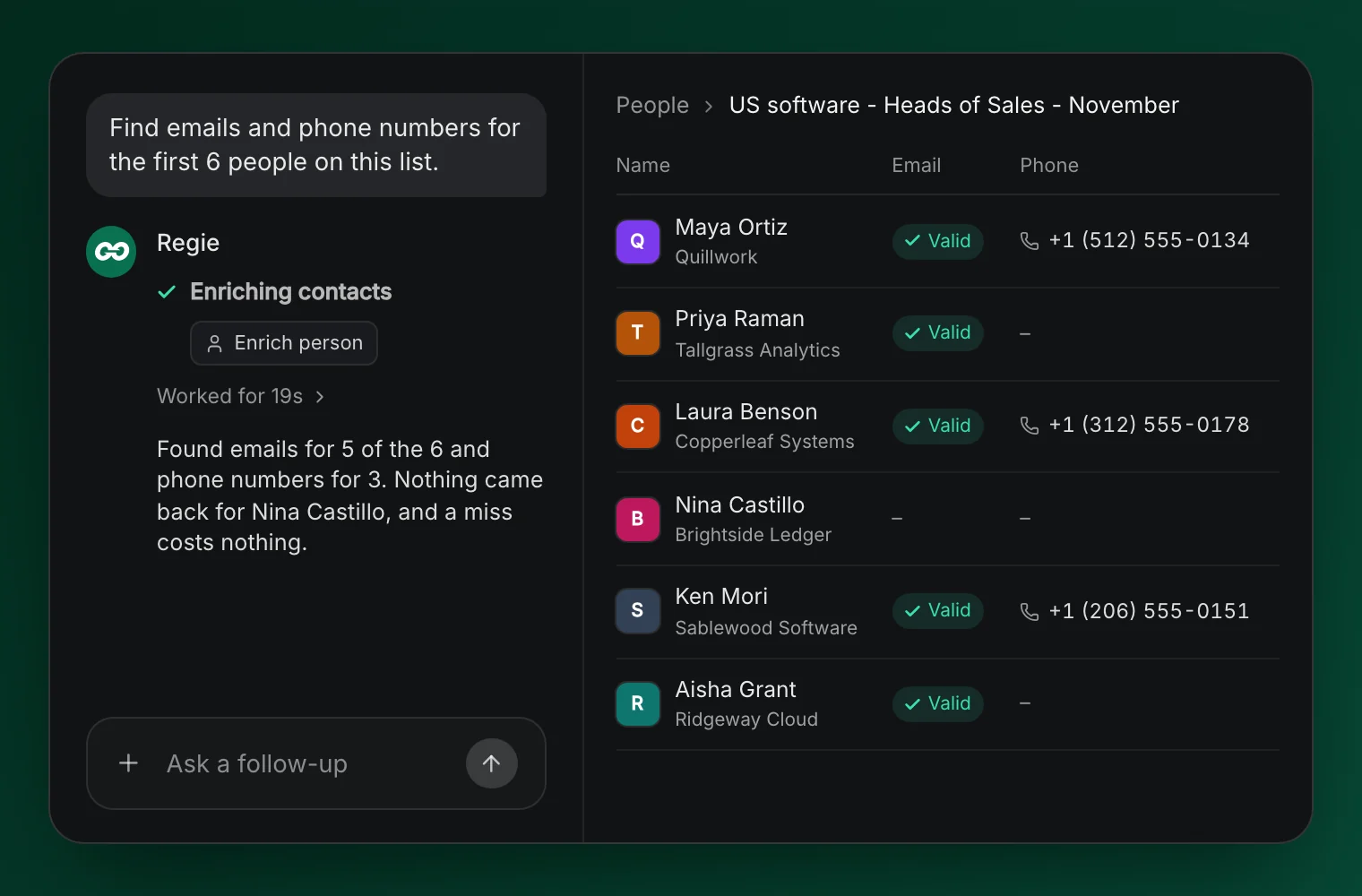
You now have people you want to reach, but you still need a way to contact them. Use RegieGO’s waterfall enrichment to look for their emails and phone numbers.
Waterfall enrichment checks multiple data providers. You can choose providers and their order, rather than relying on a single source for every contact.
Start with the people you plan to work first. If you only have time to contact a small group today, enrich that group and review the results before expanding.
Search and enrichment use credits, and costs vary by task and provider. An email or phone lookup is charged when a provider finds a result. That doesn’t mean every prospect will have every detail available, so check what came back before choosing your outreach approach.
The useful part is that this happens on the list you’ve already built. You don’t need to export it into another contact-finding tool and bring the results back to continue.
5. Give yourself a reason to contact them
Before you call or email, use RegieGO to research the accounts on your list. Give the research a purpose connected to what you sell.
For our sales-onboarding example, you could ask:
Research this company’s current sales hiring. Show the sources and dates where available.
If the company is hiring account executives, that might make onboarding a useful topic. It doesn’t prove they have a problem, so avoid turning a research finding into an assumption about their business.
Instead, use what you found to prepare a relevant question. Ask RegieGO to help draft an email or call opener, review the facts and wording, and reach out when you’re ready. Email and the parallel dialer are available in the same platform, with the appropriate account setup and access.
Your list now has a purpose beyond sitting in a spreadsheet. You know who’s on it, why they fit, and what you’d like to discuss.
What this looks like in practice
Our product team recently worked with a founder who was learning the sales workflow. During a conversation about targeting different cities, they opened her lists page and found that RegieGO had already built targeted lists through her earlier chat.
It’s a small example of the difference between getting an answer and getting work done. The conversation had produced something she could use for prospecting.
You don’t need to start with an elaborate workflow to try it yourself. Choose one audience, build a manageable list, and take it through the steps above. For what happens after the list, from research to the first call, see our 5-step sales prospecting process.
Build your first list
Start with a task already on your to-do list. It could be finding people at ten target accounts or building a fresh audience for your next campaign.
Sign up through the campaign page for $100 worth of credits, automatically applied, with calls included and no credit card required.