Personalization in Sales Outreach
Master Salesforce Dialer Integration: Best Practices for Sales Teams
The Regie Team
|
Jun 13, 2026

Introduction
Sales teams often struggle with dialer integration in Salesforce, leading to significant productivity losses. Mastering Salesforce Dialer integration is essential for sales teams, equipping them with effective strategies to improve calling efficiency and streamline workflows. With many dialer options available, how can teams select one that integrates well and enhances efficiency?
Understand the Salesforce Dialer Integration Process
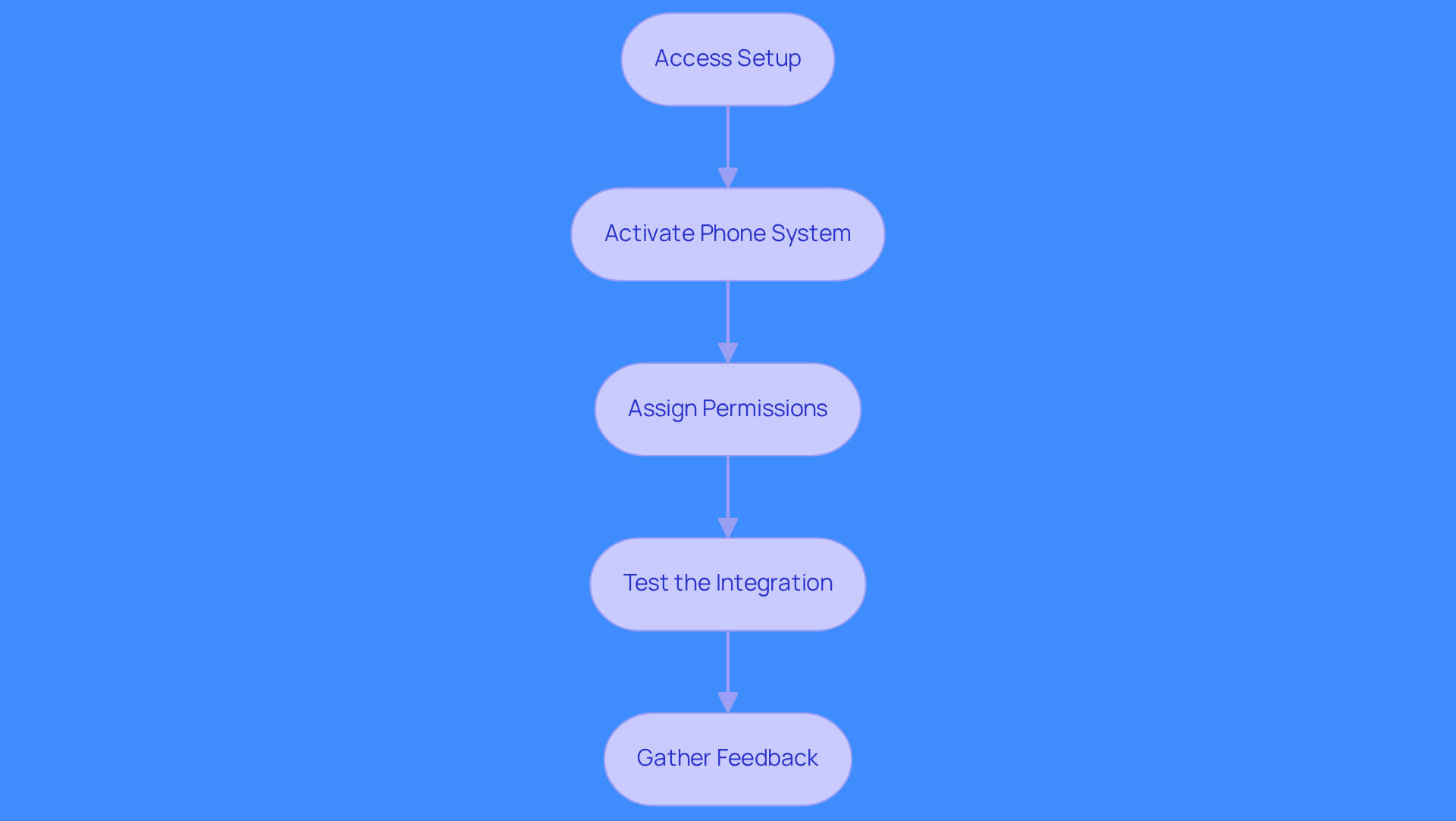
Many teams struggle with proper Salesforce configuration, leading to integration challenges. Ensure your Salesforce environment is set up correctly by following these steps:
- Access Setup: Navigate to the Salesforce Setup menu and search for 'Dialer Settings'.
- Activate Phone System: Switch on the calling feature and adjust the settings based on your marketing group's requirements.
- Assign Permissions: Create and assign permission sets to users who will utilize the dialer, ensuring they have access to all necessary features.
- Test the Integration: Conduct a test run to ensure that calls can be made and logged correctly within Salesforce.
- Gather Feedback: After initial testing, collect feedback from users to identify any issues or areas for improvement.
These steps ensure a seamless Salesforce dialer integration that boosts calling capabilities in Salesforce. Organizations that efficiently incorporate their Salesforce dialer integration report enhanced productivity and streamlined operations, making it an essential element of contemporary marketing strategies.
Integrating Regie.ai into your business process can further enhance these benefits. With Regie.ai's AI-driven automation, sales groups can streamline outreach and customize messaging across email, LinkedIn, and calls, ensuring that communication connects with potential buyers. The platform's parallel dialing feature enables groups to enhance talk time by connecting up to nine lines simultaneously, while its capability to utilize over 100 signals from sources like Google and LinkedIn aids in prioritizing leads based on genuine buying intent. This not only streamlines the prospecting experience but also significantly increases pipeline coverage by 3 to 5 times without adding headcount. Integrating Regie.ai can transform your sales outreach, driving measurable results.
Select the Right Dialer for Your Sales Needs
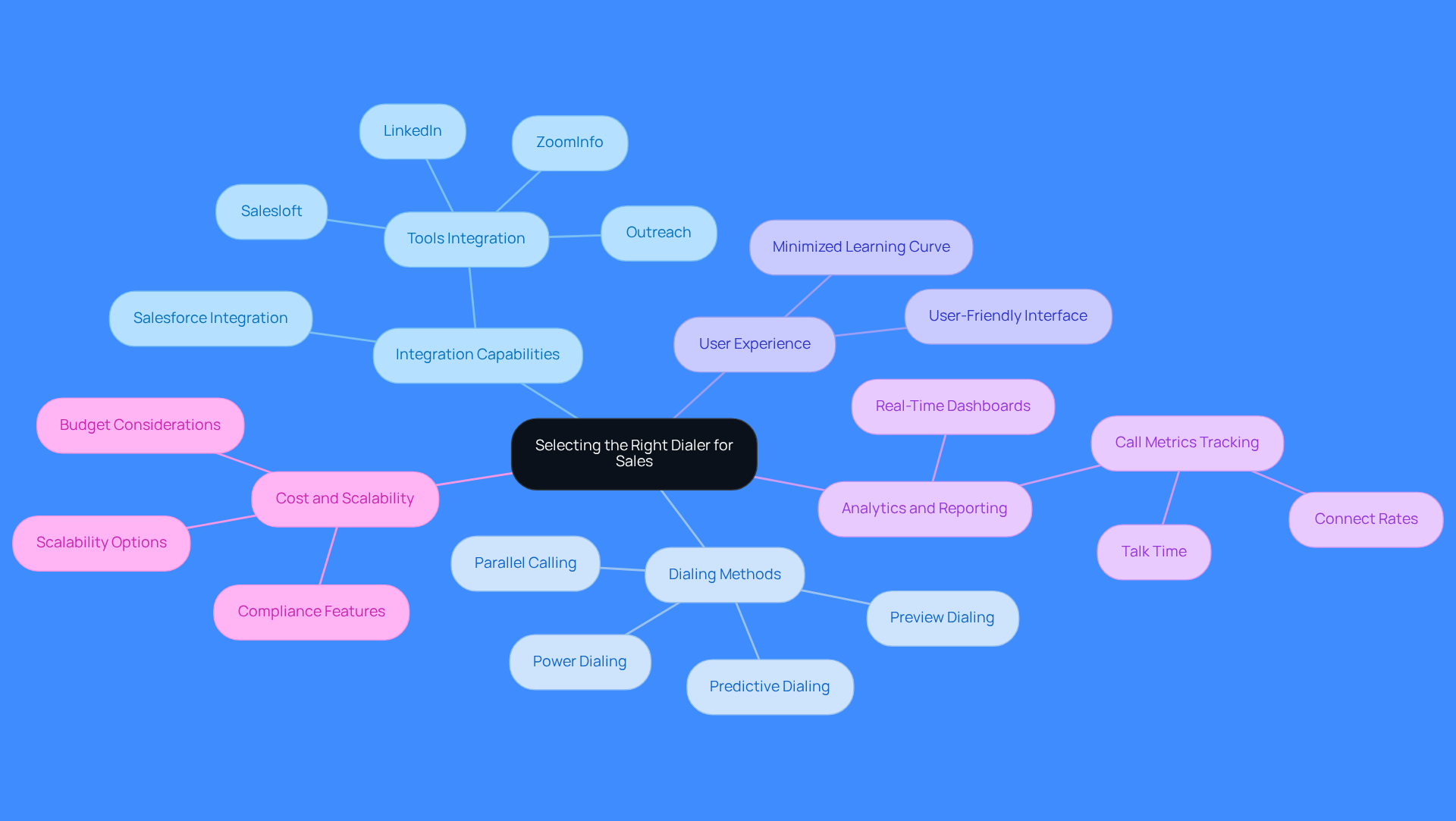
Choosing the right dialer can make or break your sales team's efficiency.
- Integration Capabilities: Ensure the dialer streamlines workflows and cuts down on time wasted switching apps. Seamless salesforce dialer integration with Salesforce and tools like Outreach, Salesloft, ZoomInfo, and LinkedIn is essential. The integration of Salesforce dialer provides real-time updates and maintains data accuracy, which is crucial for effective sales operations. Regie.ai excels in this area, offering a streamlined workflow that ensures data flows smoothly across platforms.
- Dialing Methods: Assess the varieties of calling methods available, such as predictive, power, or preview options. Regie.ai's parallel calling feature enables reps to contact up to nine individuals at the same time, significantly boosting talk time and pipeline coverage. Predictive calling can increase call volume, making it suitable for high-activity environments, while preview calling allows for more personalized interactions, enhancing engagement with prospects. Sales agents spend just 28% of their time selling because of manual tasks, making dialing mode selection critical.
- User Experience: Look for a phone system that offers a user-friendly interface, minimizing the learning curve for your team. A user-friendly dialer boosts adoption and performance, letting reps spend more time selling and less time navigating systems. Regie.ai's streamlined workflow ensures that reps can focus on selling without the hassle of jumping between tools.
- Analytics and Reporting: Choose a dialer that provides strong analytics and reporting features. Strong reporting tools help sales teams track metrics like connect rates and talk time, enabling quick strategy adjustments. Real-time dashboards can provide insights that assist teams in making informed decisions rapidly. Regie.ai enhances this with AI call scoring to promote improvement throughout the group.
- Cost and Scalability: Consider your budget and the scalability of the calling system. Ensure it can expand with your team and adjust to evolving business requirements. While some dialers may start at a lower price point, they might lack essential features or scalability options that could hinder long-term growth. Additionally, be aware of compliance features, especially with regulations like GDPR becoming crucial for businesses in Europe by 2026. Regie.ai addresses these concerns by ensuring compliance and providing the necessary tools to manage data responsibly.
With the right dialer, your team can maximize their selling time and drive significant revenue growth.
Train Your Team for Effective Dialer Utilization
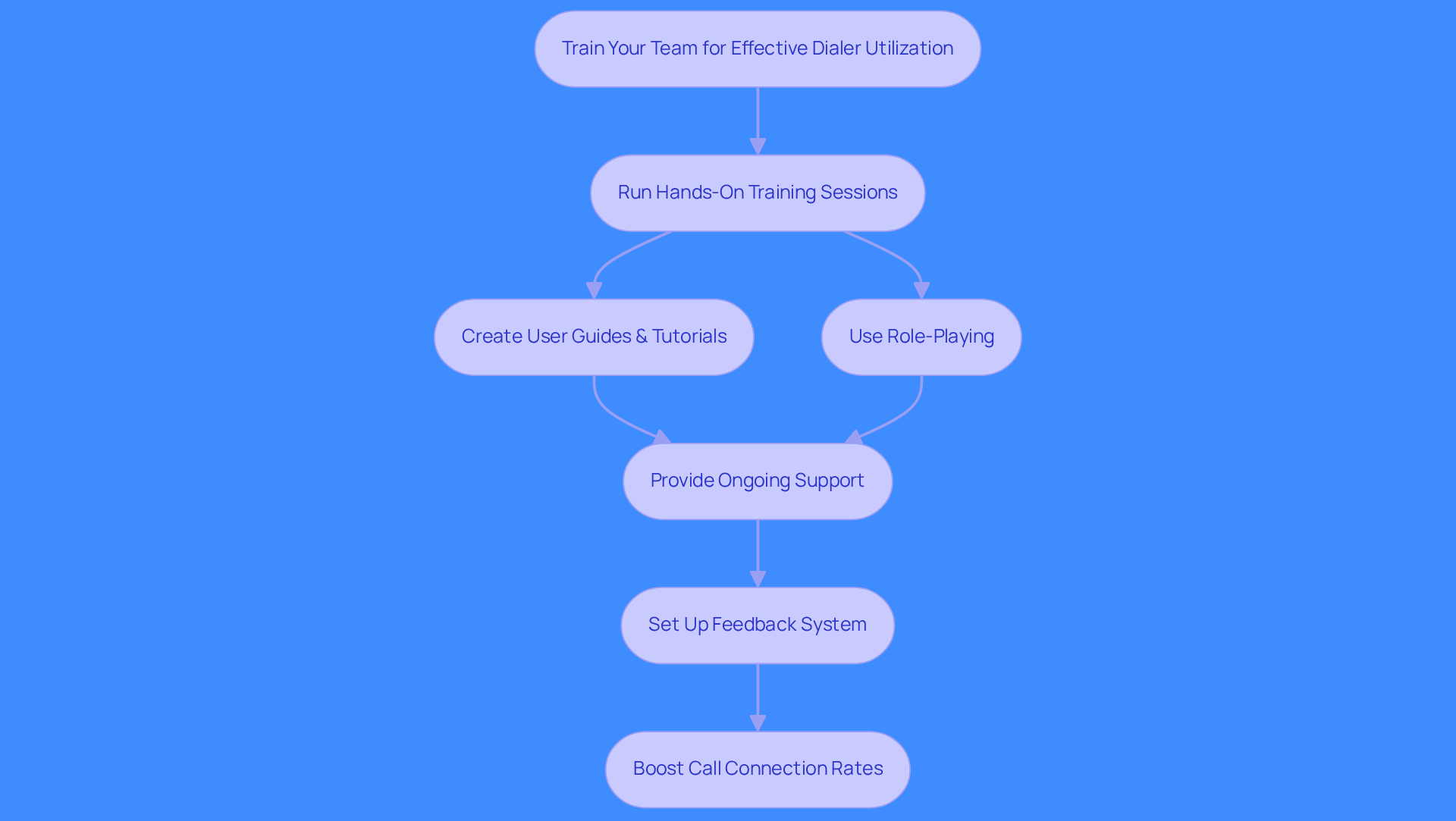
Many sales teams struggle with low call connection rates due to inadequate training on the salesforce dialer integration.
Run hands-on training sessions to help your team quickly master the salesforce dialer integration. This hands-on experience builds their confidence and skills with the tool. Sales teams that engage in practical training see a significant boost in call connection rates thanks to salesforce dialer integration.
Create user guides, video tutorials, and FAQs for easy reference. Well-structured training materials boost engagement and speed up learning.
Use role-playing to simulate real calling situations during training. This helps your team practice their pitch and improve communication skills for better prospect engagement. Practicing in a simulated environment leads to better performance on real calls.
Provide ongoing support and resources after training. Regular check-ins and refresher courses help reps keep their skills sharp. Ongoing support boosts skill retention and sales performance.
Set up a feedback system for team members to share their experiences with the salesforce dialer integration. Use feedback to improve training and address issues quickly. A feedback loop reduces challenges like low call volumes from ineffective methods.
Investing in training boosts communication efficiency and revenue, helping teams connect better with clients. Companies using predictive calling strategies have doubled their call output, proving the value of effective training.
Monitor and Optimize Dialer Performance Regularly
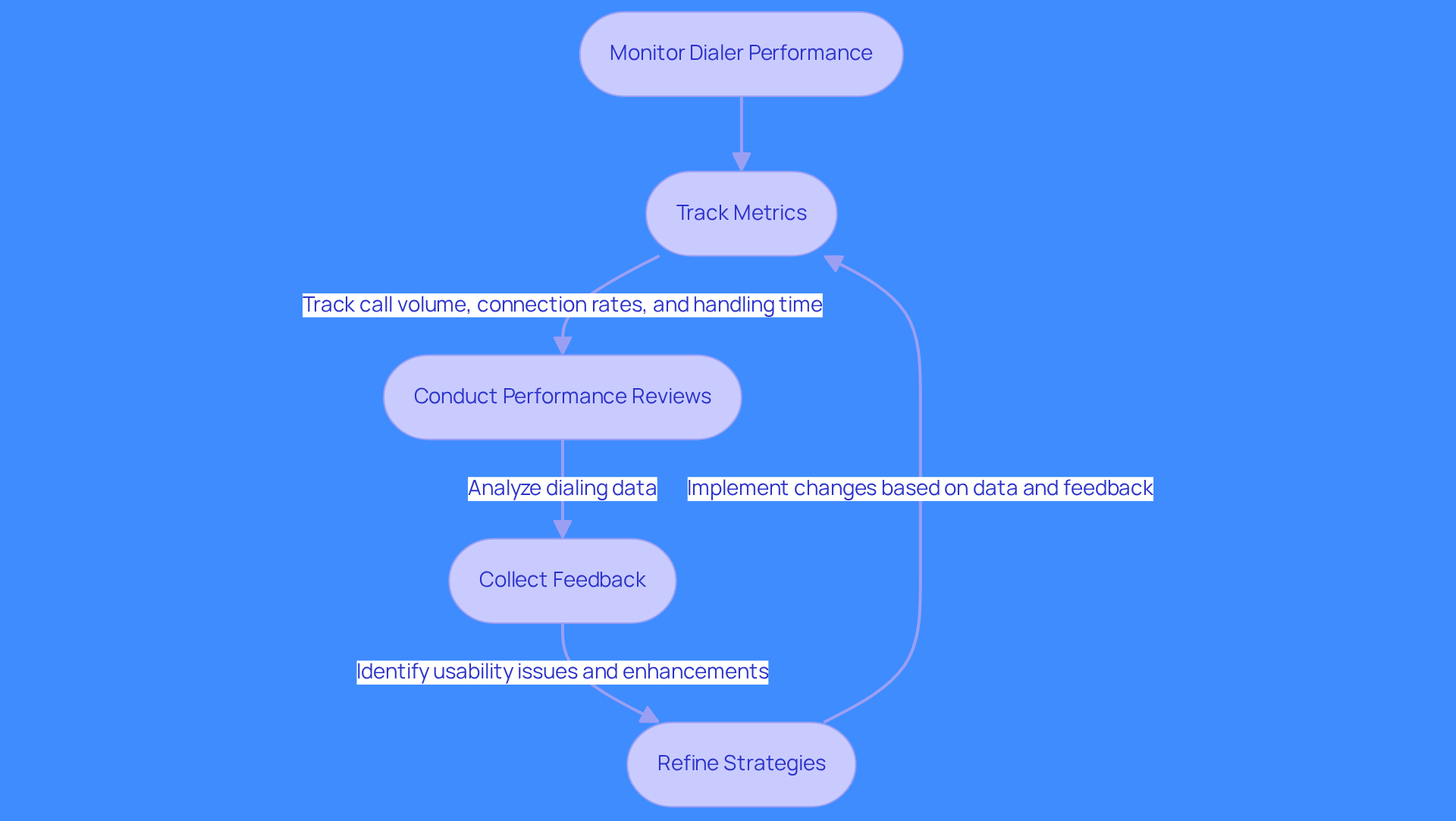
Many sales teams struggle with low connection rates and wasted time due to outdated dialing methods. Track call volume, connection rates, and average handling time to pinpoint dialing inefficiencies. These metrics reveal how well your dialing strategy is performing. Predictive dialers can significantly boost productivity, making it essential to track these metrics for maximum efficiency.
Conduct regular performance reviews to analyze your dialing data effectively. Identifying trends and areas for improvement leads to informed decision-making and strategy adjustments. Collect feedback from sales reps on their dialer experiences to identify usability issues or features that need enhancement.
Refine your calling strategies based on data and feedback to enhance outreach effectiveness. This may involve changing dialing modes, optimizing call scripts, or reallocating resources. Stay informed about new features from your service provider to enhance your dialer’s performance.
By implementing these strategies, sales teams can transform their dialing processes and drive measurable improvements in performance.
Conclusion
Sales teams face significant challenges in productivity due to outdated communication processes and fragmented tools. Integrating Salesforce Dialer is essential for boosting sales productivity and improving communication. Organizations must implement best practices in setup, selection, training, and performance monitoring. This equips sales teams with the tools to maximize outreach and drive revenue.
Key strategies include:
- Ensuring proper configuration of the Salesforce environment
- Selecting the right dialer that aligns with sales needs
- Providing comprehensive training for team members
- Continuously monitoring and optimizing dialing performance
Integrating smarter tools like Regie.ai transforms outreach efforts into a streamlined process that prioritizes genuine leads.
Embracing these practices transforms sales processes and enables teams to engage prospects more strategically. Investing in the right tools and training is not just beneficial; it's essential for achieving measurable sales outcomes in a competitive landscape.
Frequently Asked Questions
What is the first step in the Salesforce Dialer integration process?
The first step is to access the Salesforce Setup menu and search for 'Dialer Settings'.
How do I activate the phone system for Salesforce Dialer?
To activate the phone system, you need to switch on the calling feature and adjust the settings based on your marketing group's requirements.
What is required for user permissions in the Salesforce Dialer integration?
You must create and assign permission sets to users who will utilize the dialer, ensuring they have access to all necessary features.
Why is testing the integration important?
Testing the integration is important to ensure that calls can be made and logged correctly within Salesforce.
What should be done after testing the Salesforce Dialer integration?
After initial testing, it is important to gather feedback from users to identify any issues or areas for improvement.
How can integrating Regie.ai enhance the Salesforce Dialer experience?
Integrating Regie.ai can enhance the experience by streamlining outreach and customizing messaging across email, LinkedIn, and calls, improving communication with potential buyers.
What feature does Regie.ai offer to improve talk time during calls?
Regie.ai offers a parallel dialing feature that enables groups to connect up to nine lines simultaneously, boosting talk time.
How does Regie.ai prioritize leads during the sales process?
Regie.ai utilizes over 100 signals from sources like Google and LinkedIn to prioritize leads based on genuine buying intent.
What impact can Regie.ai have on pipeline coverage?
Integrating Regie.ai can significantly increase pipeline coverage by 3 to 5 times without adding headcount.
What recognition has Regie.ai received in the market?
Regie.ai has been recognized as a G2 Momentum Leader, Grid Leader, and Most Implementable Mid-Market award winner.
List of Sources
- Understand the Salesforce Dialer Integration Process
- Salesforce Integration 2026: AI, Tools, Best Practices Guide - AI Enabled Data Integrations and Analytics (https://bizdata360.com/salesforce-integration-2025-ai-tools-best-practices-guide)
- The Productivity Gap: New Survey Shows 9 in 10 Sellers Are Betting on AI and Agents To Help (https://salesforce.com/news/stories/state-of-sales-report-announcement-2026)
- 40 Sales Statistics to Watch for in 2026 (https://salesforce.com/sales/state-of-sales/sales-statistics)
- Salesforce Data Integration ROI Figures – 50 Statistics Every Business Leader Should Know in 2026 (https://integrate.io/blog/salesforce-data-integration-roi-figures)
- Latest Customer Service Statistics To Move Your Business Forward (https://salesforce.com/service/what-is-customer-service/stats)
- Select the Right Dialer for Your Sales Needs
- How to Choose an Auto Dialer in 2026 (Buyer's Guide) (https://adversus.io/blog/how-to-choose-an-auto-dialer-in-2026-buyers-guide)
- The Best Power Salesforce Power Dialers (2026 Selection) (https://withallo.com/blog/best-salesforce-power-dialers)
- The 8 Best Salesforce Dialers for Sales Teams (https://revenue.io/blog/the-8-best-salesforce-dialers-sales-teams)
- Best Power Dialers for Salesforce (2026) (https://hotprospector.com/blog/best-power-dialers-for-salesforce)
- 7 Best Salesforce Dialers in 2026 (Tested & Compared) (https://aloware.com/blog/best-dialers-for-salesforce)
- Train Your Team for Effective Dialer Utilization
- 7 Powerful Reasons Sales Teams Need an Auto-Dialer in Cloud Telephony (https://bonvoice.com/insights/sales-teams-auto-dialer-in-cloud-telephony)
- Seven strategies to hit your outbound sales dialing targets with a hybrid dialer solution (https://nobelbiz.com/blog/outbound-sales-dialing)
- Sales Training Strategies to Look Out for in 2025 (https://infoprolearning.com/blog/sales-training-strategies-to-look-out)
- 7 Ways To Maximize Use of Your Dialer | Salesloft (https://salesloft.com/company/newsroom/7-ways-to-maximize-use-of-your-dialer)
- 5 Tips to Improve Your Sales Productivity With a Sales Dialer (https://koncert.com/blog/5-tips-improve-sales-productivity-sales-dialer)
- Monitor and Optimize Dialer Performance Regularly
- Boost Outbound Call Center Performance: 5 Proven Steps (https://batchdialer.com/blog/5-actionable-steps-to-boost-your-outbound-call-center-performance)
- Maximizing Call Center Efficiency: Mastering the Predictive Dialer System | NiCE (https://nice.com/info/maximizing-call-center-efficiency-mastering-the-predictive-dialer-system)
- What You Need to Know About Outbound Dialers in 2026 | PowerDialer.ai (https://powerdialer.ai/blog/what-you-need-to-know-about-outbound-dialers-in-2025)
- Top Sales Dialing Metrics That Matter and How to Track Them (https://koncert.com/blog/top-sales-dialing-metrics)
- 5 Best Outbound Dialers for Sales Automation in 2026 (https://nooks.ai/blog-posts/5-best-outbound-dialers-for-sales-automation-in-2026)